
Built around your numbers
A clearer view.
A smarter next move.
Collect the numbers that matter. See their progress.
Know when it's time to act.
My dashboardUpdated just now
All metricsBusinessAudiencePersonal
Revenue crossed your $12,000 target.Just now
Three ways to stay in view
One dashboard.
Wherever you work.
Your full overview in a new tab. A quick check from the toolbar. A side panel that stays beside your work.
New tabToolbar popupSide panel
From a single number
to a useful signal.
A connected toolkit for
understanding, and taking action.
01 / Capture
See a number?
Make it a metric.
Select a value on a webpage, name it, and choose a refresh interval. No API integration required.
02 / Understand
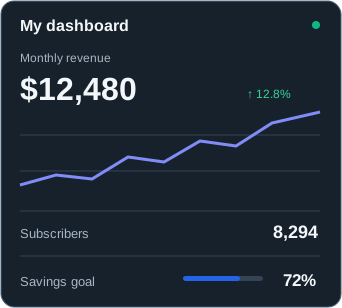
Progress you can actually see.
Follow the trend, compare changes, and keep a goal in sight.
Monthly revenue
$12,480
03 / Act
Catch the important change.
Set the rule. Get a signal when your metric crosses it.
MY ALERT RULE
When monthly revenue is
Above ↓$12,000
Revenue target reached
04 / Calculate
Make your numbers work together.
Combine tracked values into a calculated metric, with a preview as you edit.
EXAMPLE CALCULATION
Revenue−Costs
Profit · Result preview
$5,160
$12,480 − $7,320
05 / Explore
A little help with the bigger picture.
Use your chosen AI website for visual reading, analysis, and daily briefings.
Your daily briefing
EXAMPLERevenue is up 12.8% this month.
You've passed your $12,000 target.
Explore the change with your selected AI provider and metric context.
ChatGPT · Claude · Gemini · AI Studio
06 / Make it yours
Find your focus.
Keep everything in order.
Search, sort, and group your metrics. Pin what matters and switch between grid, compact, and list views.
My metricsList view
All metricsFinanceGrowth
Monthly revenue$12,480+12.8%
Newsletter subscribers8,294+8.2%
Savings goal$3,60072%
Keep your data useful—and portable.
Export history as CSV. Save a JSON backup and import it when you need to restore or merge metrics. Saved metrics live in your browser's extension storage.
Your next new tab. A better perspective.
Bring your scattered numbers together with MetricPin.
Bring your numbers together with MetricPin for desktop Chrome.
Get MetricPin for Chrome View Chrome extensionInstall from Chrome on your computer.